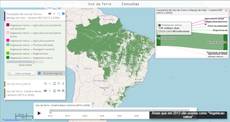
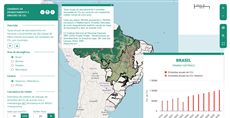
Panorama of Brazil's Forest Code
Part of the project Panorama of Brazil's Forest Code.
The map from Panorama of Brazil’s Forest Code shows the forest balance - the level of compliance with the Forest Code - of each private rural property registered in the CAR (Rural Environmental Registry), and the same figures added up for Brazil, biomes, states and municipalities. Choose a coverage area in the side panel and move the cursor over the map: a popup shows the area’s figures and its outline. Click, and the report window lists the number of rural properties and their legal reserve (LR) surplus and deficit, APP deficit and deforestation after 2008. Clicking a single rural property fetches that property’s report. Query 501 serves both the English and the Portuguese site.
How it is built
- Hover and click on a raster. Each coverage layer gets a
hoverpixelwidget whoserunOnHoverandrunOnClickpass the area code under the cursor to the layer’sonHover(popup) andonClick(report) functions. See Hoverpixel. - One data pair per coverage level. A
loadcsvreads the figures of Brazil, biomes, states or municipalities, and aloadjsonloads the matching GeoJSON so the hovered area’s outline can be drawn. See LoadCsv and LoadJson. - Floating windows. A report window and an introduction window are
windowwidgets that open at start. See Window. - A server request per property. On the rural-property layer,
onClicksends the clicked point withExtjsUtils.REQUEST.postand writes the answer into the report window. - Two languages.
setQueryGlobalPropertiesholds a Portuguese and an English text dictionary; thelangURL parameter, read withExtjsUtils.REQUEST.getParameterByName, picks the dictionary, the CSV folder and the English or Portuguese version of each map. - Legends and layer options. Base and input maps show
legendhtml(withpreventClick); a hiddenbuttonanchors each layer’s options menu. See LegendHtml, Button and layer panel buttons. - Groups and branding. Four
viewTitlegroups (interactive forest balance, base maps, input maps, results), andExtjsUtils.QUERY.decorateadds a footer with the partners’ logos. See the layer and group model.
Try this
- Switch the coverage area to states, then hover across the Amazon and the Cerrado.
- Choose rural properties, zoom in and click inside one property.
- Change
lang=engtolang=ptin the map address to get the Portuguese version.
Reference: the parameters used here
Generated from the platform source. Every entry, searchable, is in the API reference; the raw data is api.json. Open an entry for its description, parameters and example; # links to it.
QUERY · setup calls and the running query
QUERY2 entriesdecorate
function(pageProperties) : Booleanhelper# Decorates the page for the current query: header logo and top-bar style, a footer, and arbitrary CSS rules.
decorateWritten as ExtjsUtils.QUERY.decorate
Decorates the page for the current query: header logo and top-bar style, a footer, and arbitrary CSS rules. Exactly three keys are reserved:
header{Object}:logo: {src, style}puts an image in the top bar's logo container
(styleis an object of CSS properties applied to the container);topbar: {style}styles
the top bar itself.footer{Object}:htmlis the footer content,stylean object of CSS properties for it;
the footer container is shown and pinned to the bottom of the page.run{Function}: called once, after the header/footer are applied — the place for
arbitrary code that must run when the query is decorated. Every other key is passed toCSS.defineClass(key, value)as a CSS rule: the key is the selector and the value the rule body (a string such as"display: none;"or an object of CSS properties). So an accidental extra key becomes a CSS rule — do not put code under a made-up key, userun. Everything is removed when another query loads, and the whole call is a no-op while the query is only being parsed. Chain it with&&before the layer array.
- pageProperties Object
header,footer,run, plusselector: "css rules"pairs.
Returns Always true, so the call can be chained with && QUERY_DESCRIPTION.
ExtjsUtils.QUERY.decorate({
  header: {
    logo: { src: "https://example.org/logo.png", style: { "padding-left": "10px" } },
    topbar: { style: { "background-color": "#1b5e20" } }
  },
  footer: { html: "<b>Source:</b> my institution", style: { "text-align": "center" } },
  run: function() { console.log("decorated"); },
  ".x-tree-node-anchor": "font-size: 14px;"
}) && QUERY_DESCRIPTION
setQueryGlobalProperties
function(globalProperties) : Booleanhelper# Defines globals for the query: every key of globalProperties becomes a window property (a value, an object or a function) that layer definitions, markup widgets (handler=, onMark=...) and …
setQueryGlobalPropertiesWritten as ExtjsUtils.QUERY.setQueryGlobalProperties
Defines globals for the query: every key of globalProperties becomes a window property (a value, an object or a function) that layer definitions, markup widgets (handler=, onMark=...) and other query code can reference by name. The names are recorded and the globals are deleted when another query loads. A key that already exists on window and was not created by the query is refused with "Global variable can't be redefined" in the console (the platform's own globals are protected; redefining one of the query's own keys is fine). runNow is the only key the platform itself invokes: right after the globals are registered QUERY.runNow is called once (see that entry). Chain it with && before the layer array so the globals exist when the layers are evaluated; QUERY_DESCRIPTION in the examples stands for that array.
- globalProperties Object
- Object whose keys become globals; each value may be a value, an object or a function.
Returns Always true, so the call can be chained with && QUERY_DESCRIPTION.
ExtjsUtils.QUERY.setQueryGlobalProperties({
  globalCount: 0,
  onLayerButton: function(btn) { console.log("clicked", btn); },
  runNow: function() { ExtjsUtils.ZOOM.limitZoomLevel(17); }
}) && [
  { name: "CSR:estados", visibility: true, descriptionHtml: "{{button|id=b1|text=Go|handler=onLayerButton}}" }
]
hoverpixel · value under the mouse (input)
Hoverpixel4 entriesWritten in a layer's descriptionHtml as {{hoverpixel|parameter=value|...}}
Usage: {{hoverpixel}}
runOnClick
function= undefined# Defines a callback when the user clicks on the map.
runOnClickDefines a callback when the user clicks on the map.
It passes the following parameters for the callback function: handleOnClick(layerVals, inputs, coordinates, clickEvent, lastCoordinates)
- layerVals Array
- Array with the values of the maps at the pixel that was clicked.
- inputs Array
- Array with the values of the inputs defined in the descriptionHtml.
- coordinates OpenLayers.LonLat
- The point that was clicked, in the map's projection (Web Mercator, metres) despite the names:
lonis x andlatis y. For degrees, transform it:coordinates.clone().transform(ExtjsUtils.JS.getMap().getProjectionObject(), new OpenLayers.Projection("EPSG:4326"))(lastCoordinates below already holds degrees, of the previous click and hover). - clickEvent MouseEvent
- Mouse event that triggered the function.
- lastCoordinates Object
- Object with the last coordinates (latitude, longitude) from the last click and the last hover events. lastCoordinates = { click: { lat: // Latitude of the last click lon: // Longitude of the last click }, hover: { lat: // Latitude of the last hover lon: // Longitude of the last hover } }
|handleOnClick: function(layerVals, inputs, coordinates, clickEvent, lastCoordinates) {
     var degrees = coordinates.clone().transform(ExtjsUtils.JS.getMap().getProjectionObject(), new OpenLayers.Projection("EPSG:4326"));
     ExtjsUtils.ALERTIFY.log("Latitude: " + degrees.lat.toFixed(3) + " Longitude: " + degrees.lon.toFixed(3));
}|
runOnClickOutside
function# True to run the callback function even when clicking outside of the layer, False to disable.
runOnClickOutsideTrue to run the callback function even when clicking outside of the layer, False to disable. (Default False)
runOnHover
function= undefined# Defines a callback when the user hovers the map.
runOnHoverDefines a callback when the user hovers the map.
It passes the following parameters for the callback function: handleOnClick(layerVals, inputs, coordinates, clickEvent, lastCoordinates)
- layerVals Array
- Array with the values of the maps at the pixel that was hovered.
- inputs Array
- Array with the values of the inputs defined in the descriptionHtml.
- coordinates OpenLayers.LonLat
- The point that was hovered, in the map's projection (Web Mercator, metres) despite the names:
lonis x andlatis y. For degrees, transform it:coordinates.clone().transform(ExtjsUtils.JS.getMap().getProjectionObject(), new OpenLayers.Projection("EPSG:4326"))(lastCoordinates below already holds degrees, of the previous click and hover). - mouseMoveEvent MouseEvent
- Mouse event that triggered the function.
- lastCoordinates Object
- Object with the last coordinates (latitude, longitude) from the last click and the last hover events. lastCoordinates = { click: { lat: // Latitude of the last click lon: // Longitude of the last click }, hover: { lat: // Latitude of the last hover lon: // Longitude of the last hover } }
|handleOnHover: function(layerVals, inputs, coordinates, mouseMoveEvent, lastCoordinates) {
     ExtjsUtils.ALERTIFY.log("Latitude: " + coordinates.lat + " Longitude: " + coordinates.lon);
}|
runOnHoverOutside
function# True to run the callback function even when hovering outside of the layer, False to disable.
runOnHoverOutsideTrue to run the callback function even when hovering outside of the layer, False to disable. (Default False)
loadcsv · load a CSV table (input)
LoadCsv2 entriesWritten in a layer's descriptionHtml as {{loadcsv|parameter=value|...}}
getColunsInd
function() : Array.<String># Returns a copy of the header row — the column names, in order — so query code can discover columns instead of hard-coding indexes.
getColunsIndReturns a copy of the header row — the column names, in order — so query code can discover columns instead of hard-coding indexes. The name is a historical typo of getColumnsInd, kept for compatibility (the platform and many queries call it by this spelling; there is no correctly spelled alias).
Returns Copy of the header row.
var headers = inputs.id["fire_csv"].getColunsInd(); // ["Municipality", "Year", "Fires"]
var iFires = headers.indexOf("Fires");
getLines
function(columns, values, includeHeader) : Array.<Array.<String>># Returns the lines (arrays of cell strings) whose cells in columns equal the corresponding entries of values.
getLinesReturns the lines (arrays of cell strings) whose cells in columns equal the corresponding entries of values. Columns may be given by index or by header name; to filter on several columns give one value per column, e.g. getLines([1, "Year"], ["Park A", 2024]). Values are compared as strings (the CSV is always text). Called with no arguments it returns every data line (header skipped) — a common idiom. When all filtered columns were indexed with createIndexes the lookup uses the index instead of scanning every line.
- columns Array.<(String|Number)>
- Indexes and/or names of the columns to filter on.
- values Array
- One value per entry of
columns. - includeHeader Boolean
- True to also return the header line when it matches (only in the scanning path, i.e. without indexes).
Returns The matching lines; all data lines when no filter is given.
var csv = inputs.id["fire_csv"];
var rows2024 = csv.getLines(["Year"], [2024]);      // by header name
var rowsParkA = csv.getLines([0, "Year"], ["Park A", 2024]); // two columns
var allRows = csv.getLines();                         // every data line
loadjson · load JSON (input)
LoadJson4 entriesWritten in a layer's descriptionHtml as {{loadjson|parameter=value|...}}
Usage: {{loadjson}}
cors
Boolean= false# Loads the JSON through the Mappia CORS proxy (for servers without CORS headers).
corsLoads the JSON through the Mappia CORS proxy (for servers without CORS headers).
|cors=true|id
String# Defines an id for the stored info on layerInputs.
idDefines an id for the stored info on layerInputs.
|id=window-div-id|on javascript: layer.getInputs().id["NAME_DEFINED_HERE"]url
String# Defines the url to load the json from.
urlDefines the url to load the json from.
|url=https://maps.csr.ufmg.br/theme/app/data/conab/limites_municipios_conab.geojson|value
Object|Array# Value stored in inputs.id[ID]: the parsed JSON (JSON.parse of the response body — an object or an array; an empty response gives []).
valueValue stored in inputs.id[ID]: the parsed JSON (JSON.parse of the response body — an object or an array; an empty response gives []). It is undefined until the download finishes: the layer waits for the resource and recalculates on its waitend event, so beforeCalc/expression can rely on it being loaded.
{{loadjson|id=limits|url=https://maps.csr.ufmg.br/theme/app/data/example.geojson}}beforeCalc: function(inputs) {
var geojson = inputs.id['limits'];
console.log(geojson.features.length);
}window · floating window (input)
Window2 entriesWritten in a layer's descriptionHtml as {{window|parameter=value|...}}
It can only be shown when the layer is visible.
ignoreVisibility
Boolean# Defines if the window should ignore the layer visibility state.
ignoreVisibilityDefines if the window should ignore the layer visibility state. By default, the window visibility state is the same as the layer's. Set true to ignore the layer visibility state, false otherwise.
PS: The 'ignoreVisibility' is not compatible with the 'associatedButtonID' property. When both are used together, the ignoreVisibility value is ignored.
|ignoreVisibility = false|startVisible
Boolean# Defines if the window should start visible or not.
startVisibleDefines if the window should start visible or not. Set true if it should, false otherwise.
|startVisible = false|legendhtml · legend of the calculated map
LegendHtml1 entryWritten in a layer's descriptionHtml as {{legendhtml|parameter=value|...}}
Usage: '{{legendhtml}}'
preventClick
Boolean= false# Defines if the user can filter the maps categories by clicking on the legend.
preventClickDefines if the user can filter the maps categories by clicking on the legend. Set it true to ignore the legend click, false otherwise.
|preventClick = true|button · push or toggle button
Button9 entriesWritten in a layer's descriptionHtml as {{button|parameter=value|...}}
enableToggle
Boolean= false# Defines the button type as toggle.
enableToggleDefines the button type as toggle. Set true to use as toggle, false otherwise. PS: When its true the callback is 'toggleHandler', otherwise the callback is 'handler'.
|enableToggle=true|fieldLabel
String# Defines the button label.
fieldLabelDefines the button label.
|fieldLabel=A button|handler
function= undefined# Defines the callback function on button click event.
handlerDefines the callback function on button click event. This should be used when the enableToggle property is false. this inside the callback is the layer.
The value is resolved in this order: (1) a key of the layer functions object with that name; (2) a global function with that name (e.g. defined with setQueryGlobalProperties); (3) otherwise the text itself is evaluated as a function — either a full function(){...} expression or a plain statement body. With enableToggle=true and no toggleHandler, handler is used as the toggle handler.
- button Ext.Button
- The button element that was clicked.
- clickEvent EventObject
- An event object carrying information about the click event.
|handler=onExportClick||handler = function (button, clickEvent){
console.log(button, clickEvent);
}|hidden
Boolean= false# Set true to create the button hidden (Ext hidden config); show it later with Ext.getCmp(id).show().
hiddenSet true to create the button hidden (Ext hidden config); show it later with Ext.getCmp(id).show(). This is one example of the pass-through: every other Ext.Button config (iconCls, tooltip, cls, width, disabled, scale...) written in the markup is handed to the button unchanged.
|hidden=true|id
String# Defines the id to identify the object.
idDefines the id to identify the object.
|id=exemple_button|pressed
Boolean= false# Defines the button initial state.
pressedDefines the button initial state. Set it true to start pressed (only if enableToggle = true), false otherwise.
|pressed=true|text
String# Defines the button text.
textDefines the button text.
|text=Click On Me|toggle
function# Alias of toggleHandler: a function given as toggle= is moved to toggleHandler (unless one is already defined), so the Ext toggle() method of the button is never overwritten.
toggleAlias of toggleHandler: a function given as toggle= is moved to toggleHandler (unless one is already defined), so the Ext toggle() method of the button is never overwritten. Prefer toggleHandler.
|enableToggle=true|toggle=onToggleDetails|toggleHandler
function= undefined# Defines the callback function on button toggle event.
toggleHandlerDefines the callback function on button toggle event. This should be used when the enableToggle property is true. this inside the callback is the layer.
The value is resolved in this order: (1) a key of the layer functions object with that name; (2) a global function with that name (e.g. defined with setQueryGlobalProperties); (3) otherwise the text itself is evaluated as a function — either a full function(){...} expression or a plain statement body.
- button Ext.Button
- The button element that was clicked.
- state Boolean
- The next state of the button, true means pressed.
|enableToggle=true|toggleHandler=onToggleDetails||toggleHandler = function (button, pressed){
console.log(button, pressed);
}|REQUEST · page address and network
Request2 entriesgetParameterByName
function(name) : Stringhelper# Reads a parameter of the page URL query string (?name=value), URL-decoded, with + turned into spaces.
getParameterByNameWritten as ExtjsUtils.REQUEST.getParameterByName
Reads a parameter of the page URL query string (?name=value), URL-decoded, with + turned into spaces. This is the standard way for a query to receive external input (a property code, a language, a colour) from the embedding page. The name match is case-insensitive.
- name String
- Name of the URL parameter.
Returns The decoded value, or an empty string when the parameter is absent.
// page opened as /calculator/?queryid=1&car=MG-1234567-ABCD
var car = ExtjsUtils.REQUEST.getParameterByName("car"); // "MG-1234567-ABCD"
if (car) loadProperty(car);
post
function(url, params, success, failed, forceSynchronous, scope)helper# AJAX POST of a form-encoded body: params is serialized with encodeURIComponent as application/x-www-form-urlencoded.
postWritten as ExtjsUtils.REQUEST.post
AJAX POST of a form-encoded body: params is serialized with encodeURIComponent as application/x-www-form-urlencoded. Cookies are sent on cross-origin calls. Both callbacks receive the XMLHttpRequest — typical use is sending a clicked coordinate or a form to an external report service from a layer onClick handler.
- url String
- URL to post to (relative or absolute, including the protocol).
- params Object
- Key/value pairs sent as the request body.
- success function
- Called with the XMLHttpRequest when the status is 200.
- failed function
- Called with the XMLHttpRequest on any other status.
- forceSynchronous Boolean
- True (deprecated) to make the request synchronous.
- scope Object
thisfor the callbacks.
ExtjsUtils.REQUEST.post("https://example.org/report.php", {lat: lonLat.lat, lon: lonLat.lon}, function(xhr) {
    document.getElementById("report").innerHTML = xhr.responseText;
}, function(xhr) {
    ExtjsUtils.ALERTIFY.log("Report service unavailable.");
}, false, this);
Group properties
GroupProperties1 entryviewTitle
String= string.emptyproperty# Define the Title of the View that will gather together the elements inside it (Groups or other Views).
viewTitleDefine the Title of the View that will gather together the elements inside it (Groups or other Views). If an external View has in its elements another definition of a 'viewTitle', subviews will be created, like in the second example.
// Exemple 1: View with a Layers inside it
[
  {
     viewTitle: 'This View has a Group 3 Layers',
     title: 'This is a Group with 3 Layers',
     color: '#5BA300',
     elements: [
        {
           title: 'Layer 1',
           name: 'CSR:estados',
           source: 'local',
           opacity: 0.5,
           visibility: true,
        },
        {
           title: 'Layer 2',
           name: 'CSR:rios_principais',
           source: 'local',
           opacity: 0.5,
           visibility: true,
        },
        {
           title: 'Layer 3',
           name: 'CSR:geologia',
           source: 'local',
           opacity: 0.65,
           visibility: true,
        },
     ],
  },
]
// Exemple 2: View with others 'viewTitle' defined inside it
[
{
// This is the definition of the View
viewTitle: 'This External View has 2 others Inner Views inside it, each with 1 Group that has 1 Layer',
title: 'This View has 2 Groups, each with 1 Layer',
color: '#0073E6',
elements: [
{
title: 'Group 1',
// This 'viewTitle' will create a division in the menu that shows when the mouse hovers the navigation bar option 'This View has 2 Groups, each with 1 Layer'
viewTitle: 'Inner View with Group 1',
color: '#E6308A',
elements: [
{
title: 'Group 1 - Layer 1',
name: 'CSR:altimetria',
source: 'local',
visibility: true,
},
],
},
{
title: 'Group 2',
// This 'viewTitle' will create a division in the menu that shows when the mouse hovers the navigation bar option 'This View has 2 Groups, each with 1 Layer'
viewTitle: 'Inner View with Group 2',
color: '#B51963',
elements: [
{
title: 'Group 2 - Layer 1',
name: 'CSR:batimetria',
source: 'local',
visibility: true,
},
],
},
],
},
]Layer callbacks: functions you write
LayersFunctions2 entriesbeforeCalc
function= nullcallback# This function is executed before any calculation is made in the 'expression()' function.
beforeCalcThis function is executed before any calculation is made in the 'expression()' function. It runs on calculated layers (source: 'calculate'), even when there is no 'expression()', and on file layers (source: 'file'), where it runs again whenever an input changes or a resource finishes loading (see VectorLayer.generateNewLegend).
- inputs Array
- The value of each input defined in the descriptionHtml. The order of the values is the same as the inputs (i.e. the first input in the descriptionHtml is inputs[0], the second is inputs[1] and so on).
[
  {
     title: 'Example of beforeCalc function',
     color: '#FFA500',
     elements: [
        {
           title: 'This beforeCalc function will show a message at the bottom right of the screen',
           name: 'CSR:geologia',
           source: 'calculate',
           visibility: true,
           paramsButtonConfig: [
              {
                 type: 'query',
                 pressed: true
              },
           ],
           descriptionHtml:
              '{{label|text=The beforeCalc function will be called after every user interaction before any calculation}}'
              +
              '{{textfield|fieldLabel=Enter your name|id=textInput|labelStyle=text-align:center;}}',
           beforeCalc: function(inputs) {
              let inputValue = inputs[0];
              ExtjsUtils.ALERTIFY.log('Hello ' + inputValue + '!');
           },
        },
     ],
  },
]
functions
Object= null# Associate custom functions to handle events on layer callbacks such as button callbacks or any layer callbacks.
functionsAssociate custom functions to handle events on layer callbacks such as button callbacks or any layer callbacks. These functions are scoped to the Layer and can be referenced by name on layer widget callbacks. Functions can also be accessed using this.functions['<function_name>'].
[
  {
     title: 'Example of functions property',
     color: '#666699',
     elements: [
        {
           title: 'Click the button to see a message',
           name: 'CSR:geologia',
           group: 'Query',
           source: 'calculate',
           visibility: true,
           paramsButtonConfig: [
              {
                 type:'query',
                 pressed: true,
              },
           ],
           descriptionHtml:
              '{{button|id=test_button|text=Click me!|handler=handleTestButtonClick}}',
           functions: {
              handleTestButtonClick: function() {
                 ExtjsUtils.ALERTIFY.log('Button clicked!');
              },
           },
        },
     ],
  },
]