Quick start
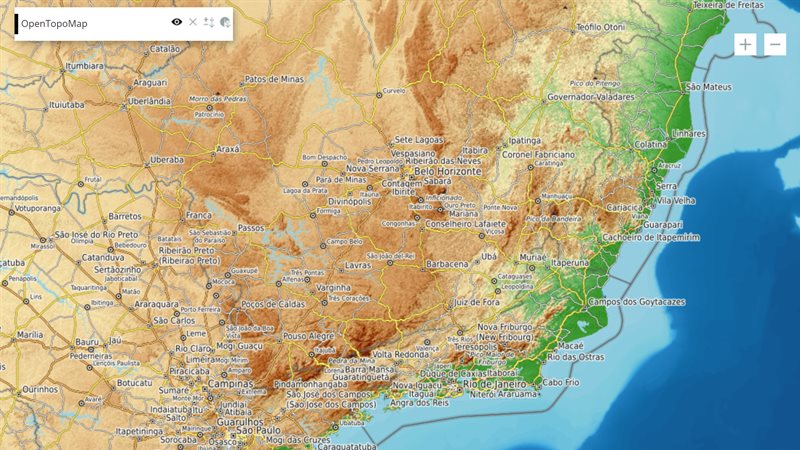
The example below, running in the Mappia calculator - click it to run it live. Full-size picture
- Run it
Click the picture: the map opens right here and runs the example. Nothing is saved, and nothing to install.
- Try it
- Read the label in the layer’s panel: it shows the current zoom level.
- Zoom in to level 7 or deeper: the coarse 500 m elevation classes give way to full detail.
- Zoom back out below 7: the elevation returns to 500 m steps.
- Make it yours
Copy the query, change it - the key parameters are below - and run it again in the playground, or paste it into the Mappia editor to save it as your map.
Key parameters
| Parameter | Example | What it does |
|---|---|---|
id | z | Required. Names the zoom: read it as inputs.id['z'] in beforeCalc, and by position (inputs[0] here) inside expression. |
value | 7 | What the input holds: the map’s current zoom level as a number, refreshed when the map stops moving. |
Every parameter, with its type and default, is in the reference at the end of this page.
Complete example
The query 21 lines · runs as is
// ZoomLevel: renders nothing; it hands the map zoom to the layer and recalculates when the
// zoom changes. Here beforeCalc writes it into a label.
[
  {
    title: "Zoom-aware layer",
    name: "CSR:altimetria",
    source: "calculate",
    opacity: 0.85,
    visibility: true,
    paramsButtonConfig: [{ type: "query", pressed: true }],
    descriptionHtml: "{{zoomlevel|id=z}}{{label|id=zoom_label|text=Zoom level: ...}}",
    beforeCalc: function (inputs) {
      var label = Ext.getCmp("zoom_label");
      if (label) label.setText("Zoom level: " + inputs.id["z"] + " - zoom in for full detail");
    },
    expression: function (layersVals, inputs) {
      // coarse 500 m classes when zoomed out, full detail when zoomed in
      return inputs[0] < 7 ? Math.round(layersVals[0] / 500) * 500 : layersVals[0];
    },
  },
];
Customize it
When it changes
The value is refreshed each time the map stops moving, but only a change of zoom counts as an input change. Panning alone does not start a new calculation round for it; tiles that come into view are still computed as usual. A zoom change then follows the usual rule for inputs: the layer recalculates after a short countdown, or right away with updateAutomatically: true.
Swap maps by zoom
beforeCalc can read the zoom and change the map the layer reads. Here the layer shows municipalities when zoomed in and states when zoomed out:
descriptionHtml: "{{zoomlevel|id=z}}",
beforeCalc: function (inputs) {
  var zoomedIn = inputs.id["z"] > 10;
  this.changeLayers({ name: zoomedIn ? "CSR:municipalities" : "CSR:estados", index: 0 });
},
Write the zoom on screen
The example sets a label’s text in beforeCalc. Check that the label exists before using it, as the example does, because Ext.getCmp returns undefined for an id it cannot find.
Pitfalls
{{zoomlevel}}renders nothing, so nothing on screen tells you it is there. Give it anidor you cannot read it by name.- It is an input: it takes a position in
inputs, indescriptionHtmlorder. Count it when you read other inputs by position insideexpression. - Inside
expressionthere is noinputs.id; read the zoom by position.